3D Rendered Watermelon for Design Projects: A Practical Guide to Enhancing Visual Creativity
What Is a 3D Rendered Watermelon and Why It Matters in Design
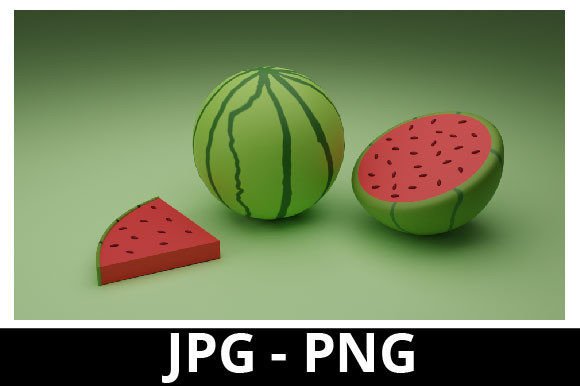
A 3D rendered watermelon is a digital asset created using 3D modeling software to represent a realistic or stylized version of a watermelon. These renderings are commonly used in graphic design, advertising, food photography, branding, and web development. Whether you're creating content for social media, designing packaging for a new line of healthy snacks, or producing illustrations for educational materials, a high-quality 3D watermelon can elevate the visual appeal and professionalism of your project.Using 3D Rendered Watermelon Before, During, and After Your Project
3D rendered watermelon assets are versatile and can be leveraged at various stages of a creative or business process.
Pre-Project Planning
Before diving into a design task, it’s important to have the right assets on hand. If you're working on a campaign for a health-focused brand or a summer-themed marketing piece, having access to a realistic 3D watermelon can help you visualize the final outcome. You can review the images included in the ZIP folder (like the green rind, red flesh, or juice droplets) and decide which versions best align with your concept. Including these elements early helps set the tone for your project. For example, if your theme is freshness and vitality, the sliced watermelon with visible seeds might convey that message better than a generic flat graphic. This stage is also where you consider compatibility—ensuring the image resolutions and file formats meet your platform requirements (web, print, or video).DurinG the Design Process
Once you start building your project, whether it's a poster, infographic, or product mockup, the 3D watermelon becomes a functional component. The transparent PNGs are ideal for layering over other background elements, while the JPG images work well for full-color prints or website banners.- Food Photography Mockups: Replace real photos with 3D renders to maintain consistency across visuals or avoid the logistical challenges of sourcing fresh produce.
- Graphic Design Elements: Use the juicy, colorful slices to highlight nutrition, hydration, or seasonal themes in wellness campaigns.
- UI/UX Prototyping: Incorporate 3D fruit elements into app or website designs to create engaging, appetizing interfaces.
Post-Production Integration
Moreover, if you're part of a team, sharing the ZIP folder with colleagues ensures everyone works from the same source material. This is particularly beneficial for maintaining visual consistency across presentations, brochures, or online content.How 3D Rendered Watermelon Complements Other Tools and Assets
Integrating a 3D rendered watermelon into your design toolkit doesn’t mean replacing all other resources—it enhances them. Here’s how it fits alongside existing tools:Design Software Compatibility: Most 3D render assets come in standard image formats that integrate smoothly into Adobe Photoshop, Illustrator, Canva, Figma, and similar platforms. Some packages may even include vector outlines or editable layers, allowing for greater flexibility in composition.
Working with Textures and Lighting: High-quality 3D watermelon images often showcase natural textures and lighting effects, making them ideal for projects that require attention to detail. When combined with stock photos of plates, knives, or tropical settings, they help create cohesive and visually rich scenes.
Collaboration with Other Digital Assets: Pairing the watermelon render with other 3D fruits or vegetables allows for balanced layouts in infographics, e-books, or educational materials about nutrition. For instance, placing a green melon next to an orange or pineapple can help emphasize a colorful, healthy diet.
Workflow Tips for Using 3D Rendered Watermelon Effectively
- Assess File Quality and Resolution: Confirm that the render matches the intended use case. High-resolution images are necessary for print, while lower-res files may suffice for digital screens.
- Use Layer Masks and Blending Modes: In editing software, apply layer masks or blending modes to seamlessly merge the watermelon into its environment. This is especially effective when adding a juicy sheen or subtle shadows to match the scene lighting.
- Experiment with Composition: Try different angles—front view, side slice, close-up of seeds—to find the most impactful layout. Sometimes a half-cut watermelon can draw more attention than a whole one.
- Maintain Brand Consistency: Adjust colors slightly to ensure the watermelon complements your brand palette. While the default render may look vibrant and natural, tweaking the hue can help it blend better with surrounding elements.
- Keep Files Organized: Create dedicated folders for each variation (e.g., “Minimal Style,” “Realistic,” “Tropical Theme”) so you can quickly locate the right image for the right purpose.
Best Practices for Long-Term Use and Reusability
One of the advantages of using 3D rendered watermelon is the ability to reuse it across multiple projects. To ensure this remains efficient:- Save Multiple Versions: Keep both original and edited copies of the watermelon image. This allows you to tweak future iterations without starting from scratch.
- Document Usage: Track which projects the watermelon was used in, including client names, platforms, and any specific edits made. This aids in repurposing the asset later or avoiding duplication in new work.
- Optimize for Performance: Compress large image files for web use while retaining quality. Use tools like TinyPNG or Photoshop’s export options to reduce file sizes without sacrificing clarity.
- Update Periodically: As design trends evolve, revisit your 3D assets to see if they still fit modern aesthetics. Newer renders might offer improved realism or additional styles like minimalist or abstract representations.
Real-World Applications and Use Cases
Here are some concrete scenarios where a 3D rendered watermelon proves valuable:Marketing and Advertising
In summer campaigns promoting hydration, freshness, or tropical flavors, a realistic watermelon render can serve as the central visual element. Its bright red and green colors naturally attract attention and communicate healthiness and sweetness.Product Packaging Design
For brands selling juices, smoothies, or healthy snacks, using a 3D watermelon graphic can reinforce the product’s association with nature and nutrition. It’s a cost-effective way to add a premium look without relying on expensive photo shoots.Web and App UI
Digital designers often use 3D elements to create immersive user experiences. A cut watermelon with visible juice can be used as a decorative icon in a fitness app or a lifestyle blog focused on wellness and healthy eating.Educational Materials and Infographics
When illustrating topics like vitamins, hydration, or food science, a 3D watermelon can serve as a focal point. Highlighting the seeds, the circle shape, or the juiciness adds depth to otherwise static information.Quality Control and Customization Considerations
- Realism and Detail: Check for accurate shading, texture, and seed placement. A poorly rendered watermelon can appear artificial or unappetizing.
- Color Accuracy: Ensure the red and green tones reflect natural watermelon hues unless you’re going for a stylized look.
- Resolution and Scaling: Avoid pixelation by using high-DPI images. Test scaling up the watermelon in your design to confirm it holds up under magnification.
- License and Permissions: Make sure the 3D render package includes usage rights for your intended application, especially if you plan to commercialize the final product.
Maximizing Efficiency with 3D Rendered Watermelon in Your Toolkit
Batch Editing: Use automation tools to apply consistent filters or adjustments across all watermelon images in your ZIP folder. This is especially useful when preparing assets for a multi-platform campaign.
Asset Libraries: Store frequently used variations in your design library or cloud storage for quick access. Label them clearly based on style, use case, and resolution.
Team Collaboration: Share the ZIP folder via internal drives or cloud services like Google Drive or Dropbox. Include a short guide explaining the contents and recommended applications to help others use the files correctly.
Feedback Loops: When presenting a design to stakeholders, explain why you chose a particular watermelon render. Mention how it supports the theme—whether through freshness, sweetness, or vitamin-rich imagery. This builds credibility and justifies your creative choices.